Big, glanceable live stats
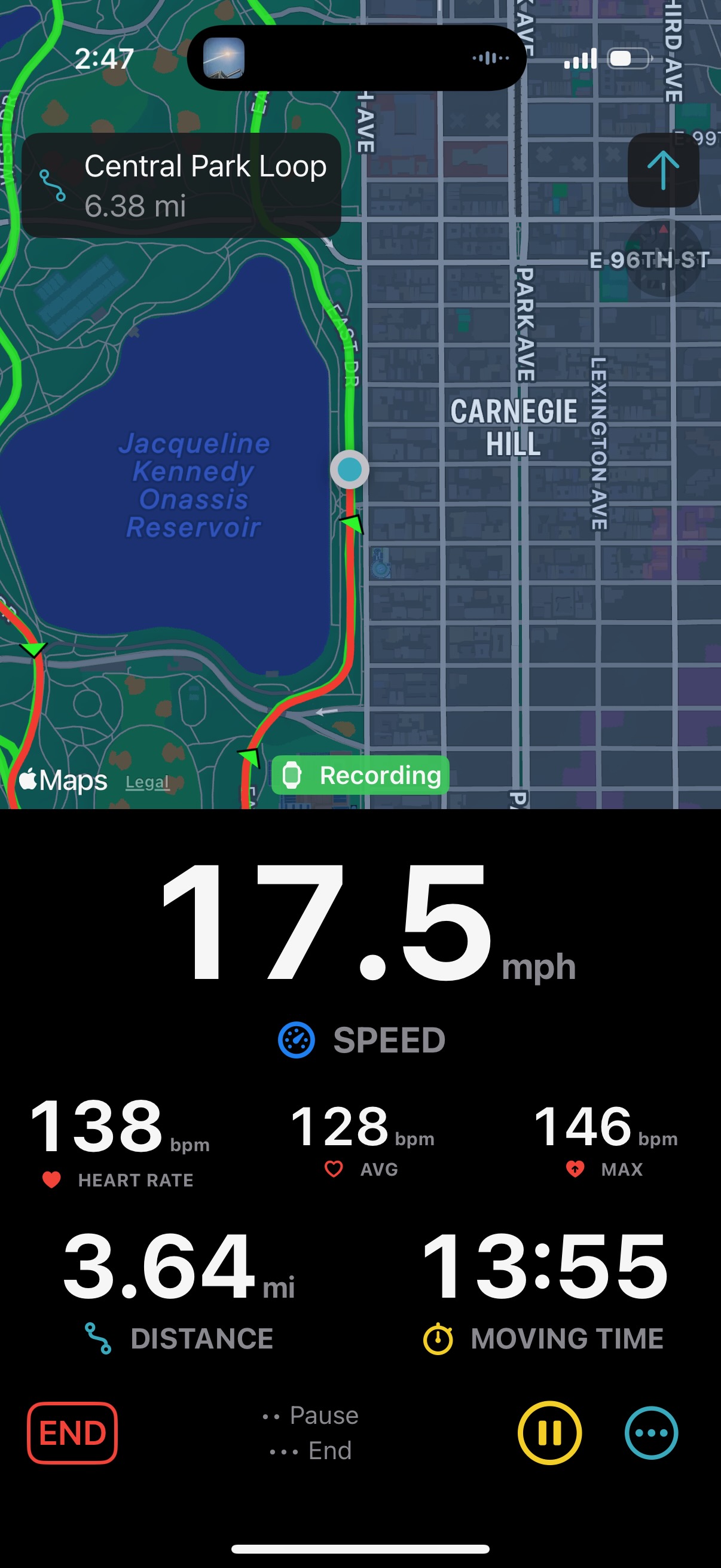
Speed (current, average, max), distance, moving time, total time, elevation (current, gained, lost) and heart rate. Swipe to resize, pick the stats you want, and keep the map or hide it.
FreeMount your iPhone on the handlebars and go. Big, glanceable stats, GPX routes with turn-by-turn directions, heart rate zones, and a full ride history. Works with Apple Watch and Apple Health. No account, no tracking, free to start.
Download on the App Storeon the App Store · Free, no account
A cycling computer that lives on the phone you already own. Here is what Mini Bike Computer does, and which parts are free.
Speed (current, average, max), distance, moving time, total time, elevation (current, gained, lost) and heart rate. Swipe to resize, pick the stats you want, and keep the map or hide it.
FreeOpen a GPX file from Files, Mail or any app and follow it on the map with direction arrows and start and end markers. Save a finished ride as a route. Export any ride as GPX.
FreeStart a ride from your wrist. The session mirrors to your iPhone so both screens show the same live data. Heart rate comes from the watch; power and cadence show up when a sensor is paired to it.
FreeSee your live zone on the ride and time in each of five zones afterwards. Zones come from Apple Health on iOS 27, or are estimated from your max heart rate, or set by hand.
FreeEvery ride is saved as a cycling workout with an estimated effort (RPE) that feeds Training Load. Rides already in Health appear in your history and lifetime totals. Turn it off anytime.
FreeEvery ride with its map, speed and elevation charts, heart rate, power and cadence. Search, rename, replay the route. Lifetime distance, time, climbing and CO₂ saved. Synced through your iCloud, optionally.
FreePause and resume from the Lock Screen and Dynamic Island. Last Ride and Lifetime Stats widgets for Home Screen, Lock Screen and Apple Watch. A Control Center button starts a ride in one tap.
Free"Start a Mini Bike Computer ride." Start, pause, resume and end from Siri or the Shortcuts app. Mix metric and imperial per stat, and choose light, dark or system theme.
FreeLoad a route and get on-screen and spoken turn cues as you ride. Turns are detected from the route itself, so any GPX works. Voice guidance can be switched off in Settings.
ProWeather alerts before you roll out. A 5-day forecast for every saved route. Temperature and wind charts on past rides so you can see what you were fighting. Powered by Apple Weather.
ProStandard, Satellite, Hybrid and Muted maps are free. Pro adds OpenStreetMap, OpenCycleMap with bike routes and contours, and a High Contrast style for bright sun.
ProAdd a live Heart Rate Zone tile and a Time of Day tile to your layout. Everything else in the stat picker is free.
ProMini Bike Computer is free with no account and no ads. Pro is a single optional in-app purchase. Here is exactly where the line is.
| Feature | Free | Pro |
|---|---|---|
| Live ride stats, customizable layout | Included | Included |
| GPX import, route following, GPX export | Included | Included |
| Apple Watch app with mirrored session | Included | Included |
| Heart rate zones and time in zone | Included | Included |
| Apple Health workouts, effort & Training Load | Included | Included |
| Ride history, charts, iCloud sync | Included | Included |
| Live Activities, widgets, Siri & Shortcuts | Included | Included |
| Standard, Satellite, Hybrid, Muted maps | Included | Included |
| Turn-by-turn directions with voice | — | Pro |
| Weather alerts, route forecasts, ride weather charts | — | Pro |
| OpenStreetMap, OpenCycleMap, High Contrast maps | — | Pro |
| Heart Rate Zone and Time of Day stat tiles | — | Pro |
A bike computer should not need an account, sell your location, or die before the ride does. Your data stays on your devices, synced only through your own iCloud if you choose.
No signup, ever. No analytics or tracking SDKs, no ads, and no servers of ours for your rides to land on. Turn off iCloud sync and everything stays on the device.
Keep the screen on for the whole ride, or let it sleep. Either way the app switches the display off at 5% battery so you can still call for a ride home. Dark theme included.
No training plans, no feeds, no social. Mount the phone, tap Start, and read your numbers. It has been that way since 2021.
No. There is no signup and no login. Download the app, mount your iPhone, and start a ride. Your rides are stored on your device and, if you leave iCloud sync on, in your own iCloud account.
Yes. Live stats, ride history, GPX import and export, the Apple Watch app, heart rate zones, Apple Health sync, Live Activities, widgets and Shortcuts are all free. An optional Pro in-app purchase adds turn-by-turn directions, ride weather and route forecasts, OpenStreetMap, OpenCycleMap and High Contrast map styles, and extra stat views like Time of Day and a live heart rate zone.
Yes. The Apple Watch app records rides on its own and, on watchOS 10 and iOS 17 or later, mirrors the session to your iPhone so both screens show the same live stats. Heart rate comes from the watch, and power and cadence appear when a sensor is paired to your Apple Watch. The watch also has ride history and widgets.
Yes. Import a GPX file from Files, Mail or any app, and the route appears on the map with direction arrows and start and end markers. Mini Bike Computer Pro adds turn-by-turn directions with on-screen and spoken turn cues. You can also save any finished ride as a route and export rides as GPX.
Yes. With an Apple Watch, the app records heart rate and shows time in each of five zones on every ride. Zones come from Apple Health on iOS 27 and watchOS 27, can be estimated automatically from your max heart rate, or set manually in Settings.
Yes. Rides are saved to Apple Health as cycling workouts with an estimated effort (RPE) that feeds Apple's Training Load. Cycling workouts already in Apple Health can be shown in your ride history and lifetime stats. Health recording can be turned off in Settings.
There is no built-in Strava integration. Rides are saved to Apple Health and can be exported as GPX files, which you can upload to Strava or any other service yourself.
You choose whether the screen stays on during a ride. If it does, the app turns the screen off automatically when the battery reaches 5% so you still have power to get home. A dark theme is available, and the app follows your system light or dark setting by default.
iPhone and iPad running iOS 16 or later, and Apple Watch running watchOS 10 or later. Some features need newer software: Live Activities need iOS 16.1, the Control Center start button needs iOS 18, and Apple Health heart rate zones need iOS 27 and watchOS 27.
On your device, and optionally in your own iCloud account so rides and routes sync between your iPhone, iPad and Apple Watch. There are no Mini Bike Computer servers and no analytics or tracking SDKs. Turn off iCloud sync in Settings to keep everything on-device.
Download Mini Bike Computer and get on the road. Free to start, no account required.
Download on the App StoreRequires iOS 16 or later. Works on iPhone, iPad and Apple Watch (watchOS 10 or later).